AI customer support that remembers your policies
 By Michel Escoda · Published · 9 min read
An AI support assistant gives the right answer when it reads your current policies, knows which customers get special treatment and respects your refund limits. In CrystalBrain, those rules live in one memory, split into brains such as Policies or Key Accounts, and every support tool reads the same memory. This page walks through a demo of it, built for a customer service team.
CrystalBrain is one memory your AI apps share: your helpdesk assistant, ChatGPT, Claude and your own tools read and write it, and you can see and fix every memory. Kestrel Outdoor, the company in this demo, is fictional. The memories, searches and screens come from a real CrystalBrain workspace we built for the demo; the company and its figures are made up.
Why do AI support assistants give wrong policy answers?
Most wrong answers come from four gaps. The assistant reads an old version of a policy, because nobody removed the 2024 help-centre article. It does not know that a customer is a key account with its own terms. Each new tool has to be taught the same rules again. And nobody can see what the assistant actually knows, so nobody can fix it.
Kestrel Outdoor sells outdoor gear online in Europe, with about 40 support agents on two tiers. Three AI tools help them: a drafter inside the helpdesk, ChatGPT for the Tier 2 agents, and an onboarding academy for new hires. All three read one CrystalBrain end user, the Kestrel Support Assistant.
How is the support team’s memory organized?
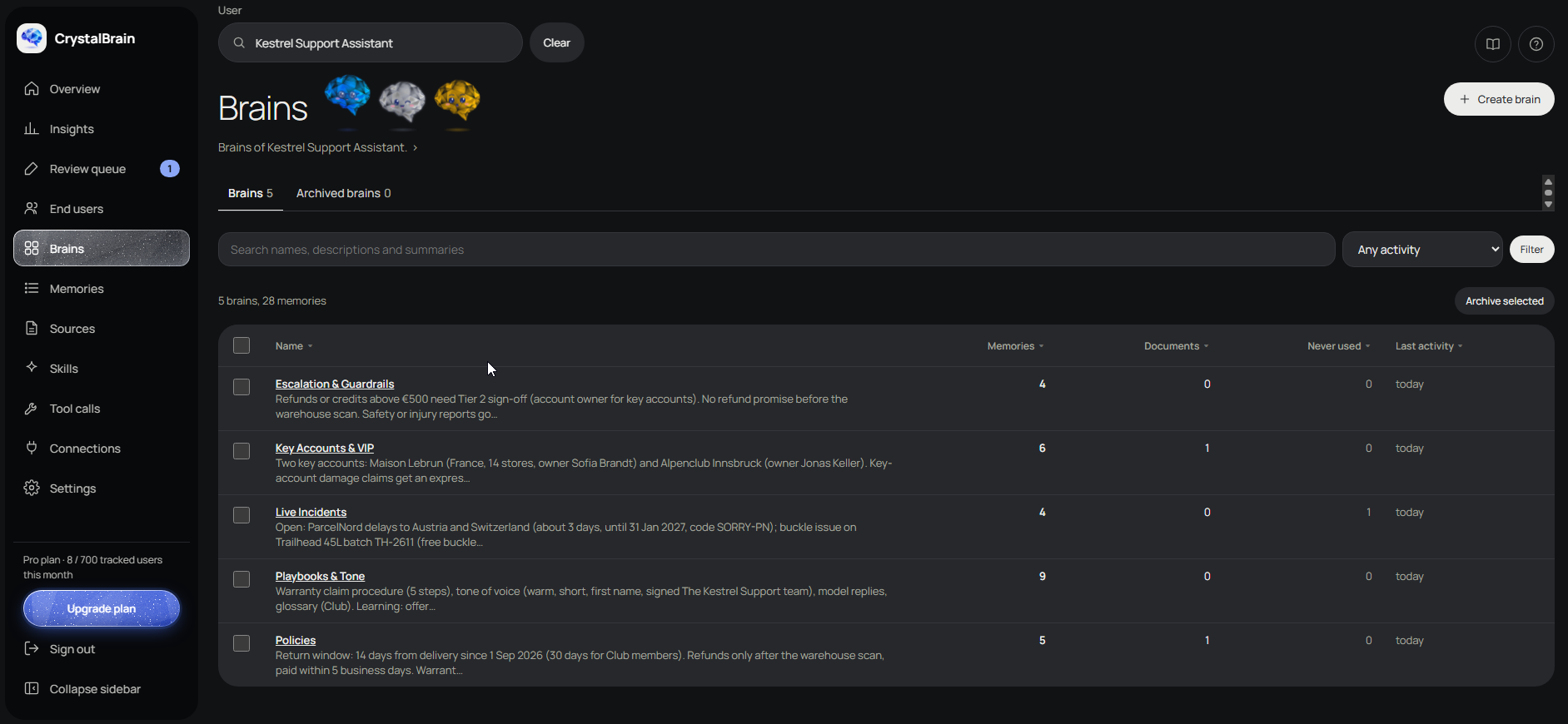
The memory is split into five brains, one per kind of knowledge. Each brain has a one-line description, a summary, and a framing: a short instruction that the AI receives with every search of that brain.
Inside a brain, memories are sorted into sections such as facts, constraints, procedures and open questions, with decisions on their own tab. The framing of the Policies brain reads: “Answer policy questions with the policy in force today and say since when it applies. When two policies disagree, the one with the latest effective date wins.” The user guide on brains explains each tab.
What happens when a customer asks about an old return policy?
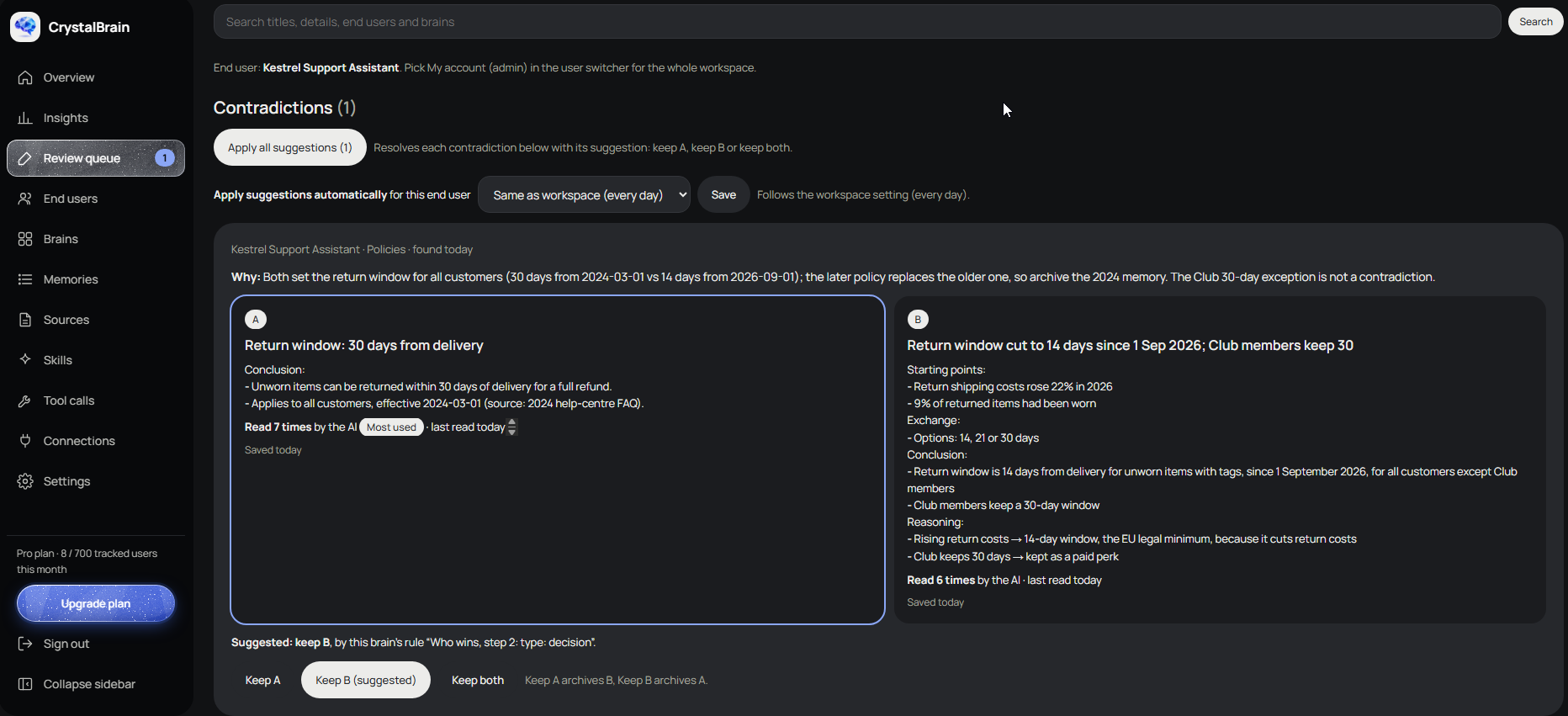
The memory still holds the old policy, and CrystalBrain flags it. A customer writes: “I got my Ridgeline jacket 20 days ago and it doesn’t fit. Can I still return it?” The helpdesk drafter searches the memory with that message. The search returns both versions of the return window:
- a fact from the 2024 help centre: “Return window: 30 days from delivery”;
- a decision: “Return window cut to 14 days since 1 Sep 2026; Club members keep 30”, with its context, the options considered and the reason.
The framing tells the AI that the latest effective date wins, so the draft says 14 days and offers the free repair from the model reply stored in Playbooks & Tone. The 14-day window matches the EU’s legal minimum withdrawal period for online purchases (Consumer Rights Directive).
The old fact should not stay there. Each night, and whenever you click Check now, a memory check compares the memories of each brain. It found the two return windows and put them in the Review queue, with a suggestion to keep the newer decision. A rule of the Policies brain says a decision wins over a fact and the newer one wins after that.
Suggestion Keep the decision: a decision wins, then the newest. The fact is archived and marked “true until” the day the decision took over.
A team lead accepts the suggestion in one click, or lets the workspace apply suggestions on its own after 24 hours. The 30-day fact is archived with its end date, so a search “as of” October 2025 still finds what was true then. Our article on why AI memory contradicts itself explains where these conflicts come from.
How does the assistant handle a key account and a refund limit?
One search with the whole ticket returns the account’s terms and the refund limit. The ticket: “Order #48213 from Maison Lebrun arrived damaged: 12 Basecamp tents, €1,800. They ask for a full refund today.”
The key-account instruction says damaged goods get an express replacement with no return. The constraint says the assistant never approves more than €500 itself. So the draft offers the replacement, does not promise the refund, and routes the decision to the account owner.
This ticket changed CrystalBrain. When we first built the demo, the long ticket buried two memories: the Maison Lebrun account and the €500 limit each matched only a small part of it, and the search left them out. Since 22 November 2026, a memory that names something the request names, such as “Maison Lebrun”, is kept, and the user’s constraints come back with every search as standing rules. The same ticket now returns both. For requests that mix several topics without a name to hold on to, one search per topic still finds more than one long search.
How do temporary incidents stop being used?
Each incident carries a date after which the AI no longer reads it. “Where is my parcel? I ordered a sleeping bag 6 days ago, delivery to Vienna.” The search returns the ParcelNord delay to Austria and Switzerland, about 3 days, with the instruction to apologise and offer the code SORRY-PN. That incident stops being used on 31 January 2027.
The payment incident of 12 November 2026, when 312 orders were charged twice, ended on 14 November. Searches no longer return it, and it stays in the brain as history.
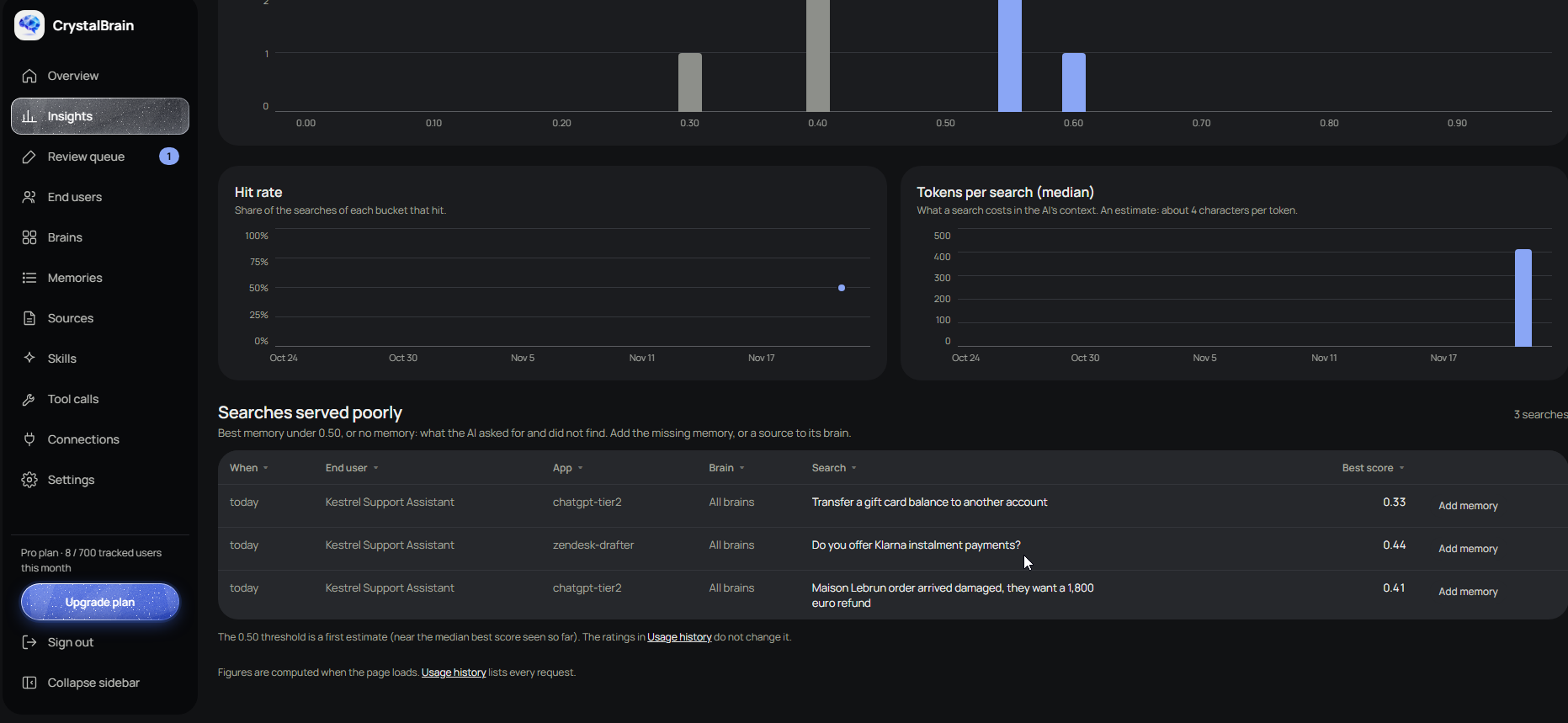
The opposite problem shows up in Insights. Retrieval quality lists the searches served poorly: what the AI asked for and did not find. In the demo, “Do you offer Klarna instalment payments?” and “Transfer a gift card balance to another account” have no good memory. That list is the support team’s backlog of answers to write.
Which rules keep the memory clean automatically?
Each brain has its own check rules, written in the team’s words. CrystalBrain applies them during the memory checks: what can never be archived automatically, what must never be merged, and which memory wins a conflict.
| Brain | Check instruction (excerpt) | Rules | Fields |
|---|---|---|---|
| Policies | Exceptions for Club members or key accounts are not contradictions. | Protect constraints · decision, then newest, wins | Effective date, Applies to |
| Escalation & Guardrails | Flag any memory that would loosen a limit for human review. | Protect constraints and anything a person wrote | Approver, Limit EUR |
| Live Incidents | Two reports of the same incident are duplicates: keep the latest end date. | Newest wins | Affected orders, Workaround |
The fields are the brain’s own columns: an “Effective date” on every policy, an “Approver” and a limit on every guardrail. When an app saves a memory into the brain, CrystalBrain fills them from what the app sent.
Do all the support tools get the same answers?
Yes, because they read the same memory. In the demo, the helpdesk drafter wrote the refund-timing fact, ChatGPT wrote the key-account notes, and the onboarding academy wrote the warranty procedure. Each brain lists the apps that read it, and the Tool calls page shows what each app called: helpdesk tickets, orders, parcel tracking.
| App | Used by | Example memory it wrote | Example tools it called |
|---|---|---|---|
| zendesk-drafter | Tier 1 agents | Refunds paid within 5 business days of the warehouse scan | Get ticket, get order, create draft |
| chatgpt-tier2 | Tier 2 agents | Maison Lebrun: B2B key account in France | Get order, get refund, internal note |
| onboarding-academy | New hires | Warranty claim, step by step | Get training module |
The rest of the setup sits next to the memories. Two skills belong to this user: “Support reply drafter” and “Damage claim triage”, reusable instructions that the apps fetch by name. The Policies brain holds the full Returns & Refunds Policy as a file, cut into passages that searches return, and links to the EU rules on returns. Read more about one memory shared by several AI apps and how skills work.
How we built this demo
We loaded the demo with a script that calls the CrystalBrain REST API: 23 saves for this user, which CrystalBrain turned into 28 memories. When a save holds several ideas, such as a customer and the language to use with them, it is split into one memory each. Brain settings, saved prompts and web pages are dashboard settings; for the demo, we wrote them with a SQL script.
What the demo does not do: CrystalBrain does not read your helpdesk by itself. Your apps send it what to remember, through MCP, the REST API or the TypeScript and Python SDKs. Web pages attached to a brain are stored as links; searches do not read their content. Memory checks run every day on paid plans.
FAQ
Does CrystalBrain connect to Zendesk or Intercom?
Not with a built-in connector. Any assistant that supports MCP can read and write the memory, and any app that can call a REST API, including a helpdesk automation, can use it. The Connections guide lists the options.
Does this replace our help center?
No. The help center stays the public source. CrystalBrain holds what the AI needs to answer correctly: the policy in force, exceptions, limits and lessons from solved tickets, with the date each one applies.
Can each agent or customer have their own memory?
Yes. This demo uses one end user for the support assistant, with brains per topic. You can also create an end user per customer or per agent, and share common brains with groups of users.
What happens to customer data when a customer asks to be forgotten?
If you keep customer data as their own end user, deleting that user removes all their memories, files and activity. The deletion takes two steps, with 7 days to cancel.