An AI IT helpdesk that follows your own procedures
 By Michel Escoda · Published · 9 min read
An AI IT helpdesk answers well when it uses your own setup, the fixes your technicians found and the security rules your CISO set, not generic vendor advice. In CrystalBrain, that knowledge lives in one memory, split into brains such as Known Errors or Security & Access, and every helpdesk tool reads the same memory. This page walks through a demo built for an IT service desk.
CrystalBrain is one memory your AI apps share: your Teams bot, your technicians’ copilot, Claude and your own tools read and write it, and you can see and fix every memory. Norvalia, the company in this demo, is fictional. The memories, searches and screens come from a real CrystalBrain workspace we built for the demo; the company and its figures are made up.
Why do AI helpdesk bots give generic or outdated answers?
Most bad answers come from four gaps. The bot falls back on vendor documentation, which knows nothing about your VPN portal. It reads an article written for a tool you replaced last month. It never hears about the fix a technician found last week. And it does not know which requests it must refuse. Behind all four, nobody can see what the bot knows, so nobody can fix it.
Norvalia has about 800 employees in Lyon, Ghent and Porto, on Microsoft 365, Entra ID, Intune and Jira Service Management. Three AI tools help: a bot that answers employees in Teams, a copilot for the L1 and L2 technicians, and Claude for the IT manager. All three read one CrystalBrain end user, the Norvalia IT Helpdesk.
How is the IT helpdesk’s memory organized?
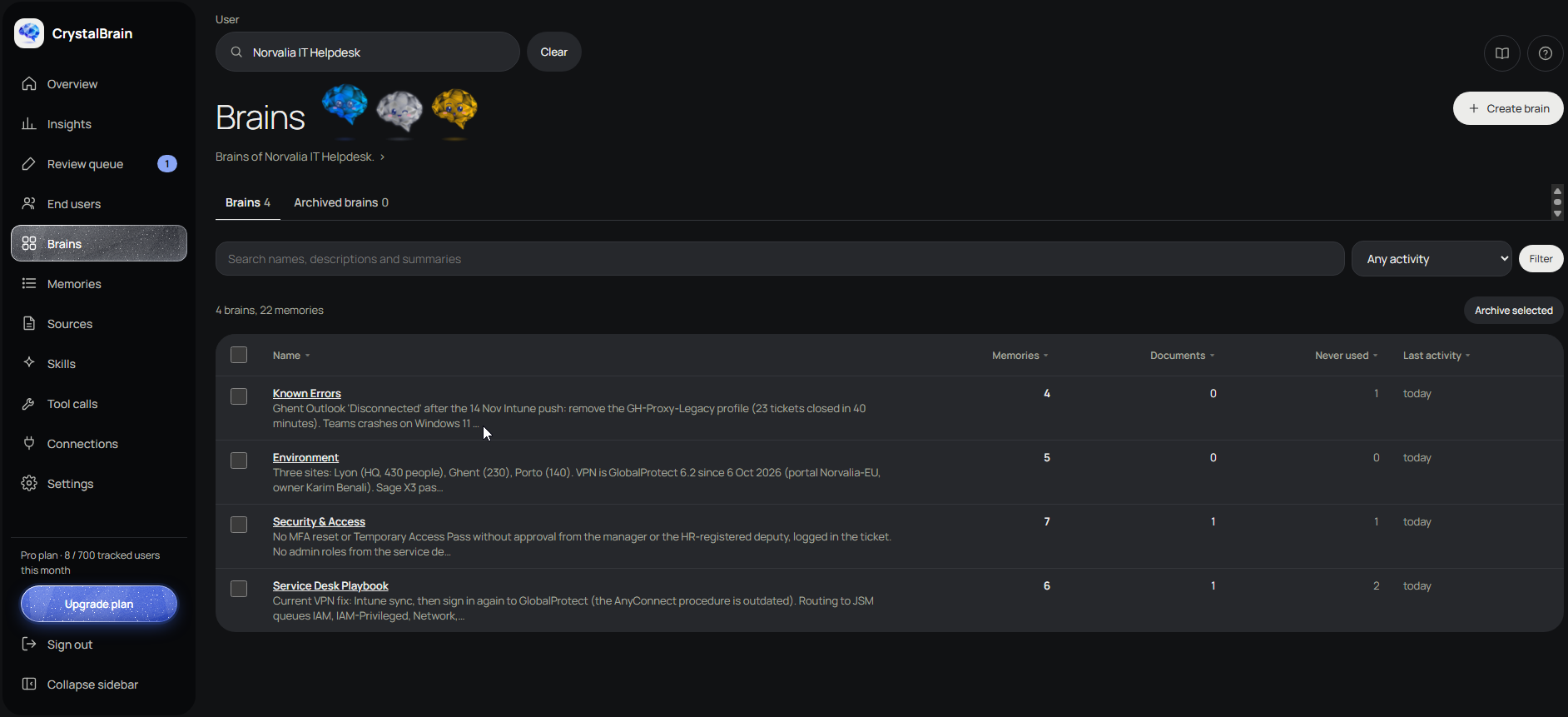
The memory is split into four brains, one per kind of knowledge. Each brain has a one-line description, a summary, and a framing: a short instruction that the AI receives with every search of that brain.
Inside a brain, memories are sorted into sections such as constraints, procedures, learnings and glossary, with decisions on their own tab. The framing of the Environment brain starts: “Answer with Norvalia’s own setup, never with generic vendor advice.” The user guide on brains explains each tab.
What happens when an employee reports a problem the technicians already solved?
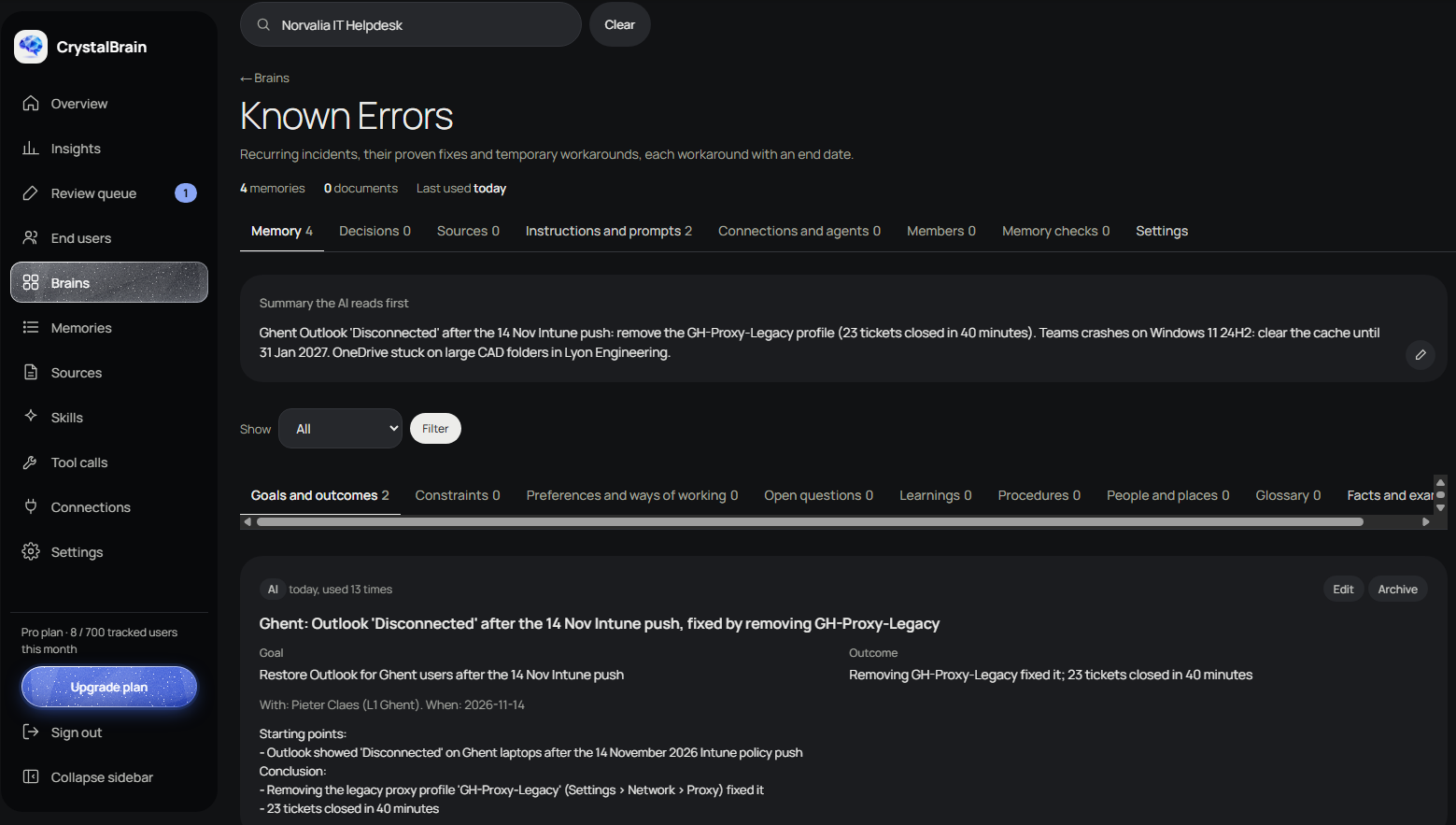
The search returns the technicians’ fix first. An employee writes in Teams: “Outlook says ‘Disconnected’ since this morning. I’m in the Ghent office.” The top result of the Teams bot’s search is an episode from Known Errors: after the Intune push of 14 November, removing the legacy proxy profile GH-Proxy-Legacy fixed Outlook on Ghent laptops, 23 tickets closed in 40 minutes. A fact from Environment follows: about 60 Ghent laptops still carry that profile. Two unrelated VPN procedures come lower.
The technician copilot wrote that episode; the Teams bot reads it. The playbook also holds the lesson: 3 or more tickets with the same symptom on one site within an hour means opening a Problem. The employee’s message did not bring that rule back. A technician’s question did: “Third Outlook ticket from Ghent this hour. Fix them one by one or open a Problem?”
Known errors also expire. The Teams cache workaround for Windows 11 24H2 stops being used after 31 January 2027. The Ghent guest Wi-Fi outage ended on 7 November: a search today skips it, and a search “as of” 5 November still finds it.
What does the AI do when a request breaks a security rule?
The rule and the approved path come back together, so the AI can refuse and still help. A technician pastes: “Anna Dupuis lost her phone and her manager is on leave. Reset her MFA so she can work today.” The copilot searches the Security & Access brain and gets:
- a constraint: no MFA reset or Temporary Access Pass without approval from the manager or the HR-registered deputy, logged in the ticket;
- a decision: for a lost phone, a YubiKey 5 NFC from site stock, no SMS fallback, with the options considered and the reason;
- a procedure: a one-time pass valid 8 hours, given by phone, never by email or chat;
- passages from the file “Lost device & MFA recovery procedure”.
The brain’s framing comes with them: “Constraints in this brain are hard limits. When a request would break one, refuse clearly and give the approved path step by step.” So the answer resets nothing yet: it asks for the deputy’s approval, then walks through the key and the Temporary Access Pass. A local admin request gets the same treatment: the search returns the rule that the service desk never grants admin roles, so it goes to the IAM-Privileged queue.
How does the memory catch an outdated procedure?
A memory check flags it; until then, both versions sit in the memory. An employee writes: “I’m working from home in Porto and the VPN won’t connect. What do I do?” The Teams bot’s search returns two procedures:
- “VPN fix: reinstall the Cisco AnyConnect 4.10 profile”, from the 2025 knowledge base, saved by the Teams bot;
- “VPN fix: Intune sync, then sign in again to GlobalProtect”, in force since 6 October 2026, saved by the technician copilot.
The old one ranked first; the rest of the memory points to the current one. A fact says the VPN is GlobalProtect since 6 October, and the migration runbook ends with “Do not reinstall AnyConnect”. When the bot searches the playbook brain, its summary calls AnyConnect outdated and its framing says to prefer the most recent procedure. The answer to expect is the GlobalProtect steps.
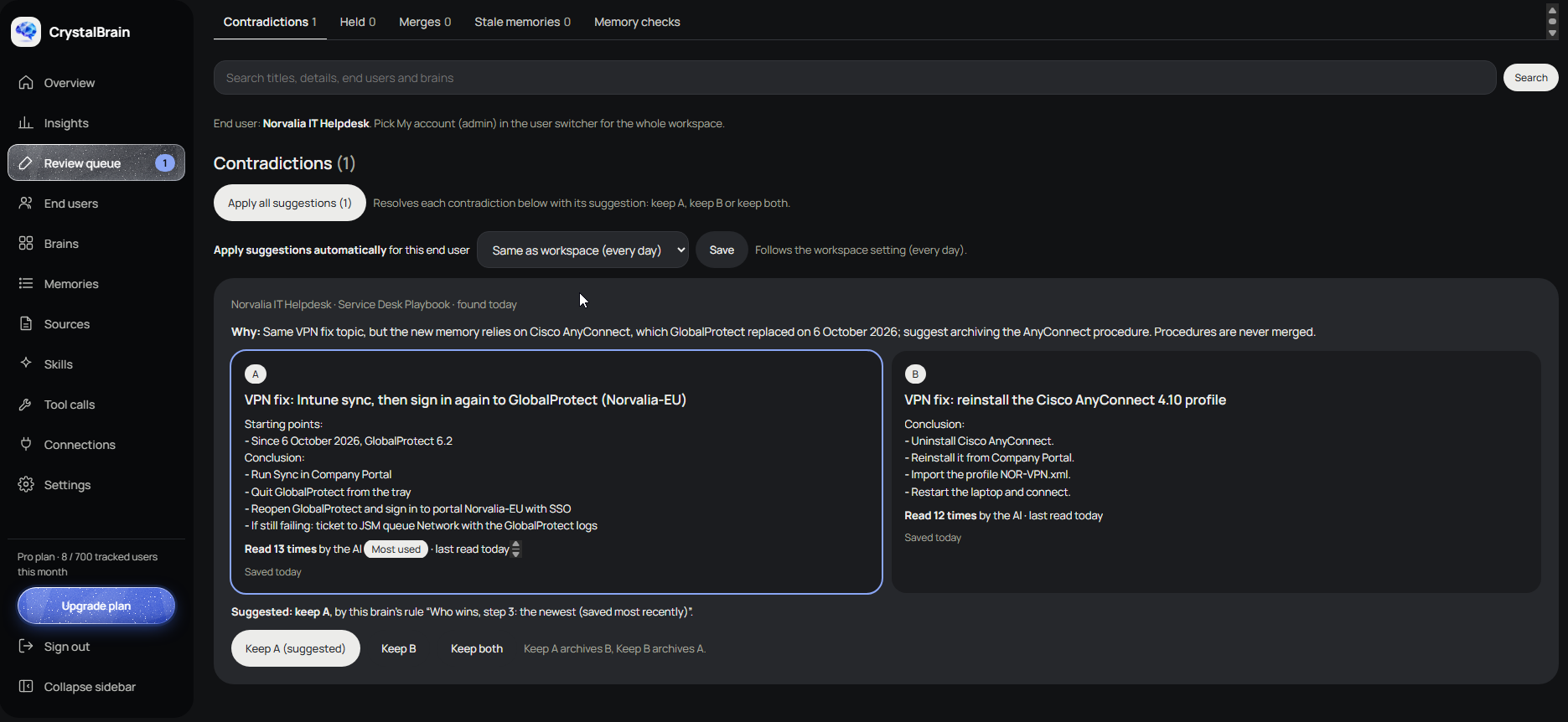
Leaving both is a risk, so the memory check of the playbook put the pair in the Review queue. Neither memory was written by a person and both are procedures, so by the brain’s rules the newest wins.
Suggestion Keep GlobalProtect, by the rule “Who wins, step 3: the newest”. The AnyConnect procedure is archived with a “true until” date.
The IT manager accepts it in one click, or lets the workspace apply suggestions on its own after 24 hours. The archived procedure keeps an end date, so a search “as of” an earlier day still finds it. The help article on resolving contradictions covers each option.
The other gap is knowledge the memory never had. Insights › Retrieval quality lists the searches served poorly: no memory scored 0.5 or more. In the demo, “How do I print on the large-format plotter in Porto?” only found a general note on printers, and “Recover the FileVault key of a MacBook” found nothing. Those are the next two articles to write. The Insights guide explains the tab.
Which rules keep the memory clean automatically?
Each brain has its own check rules, written in the team’s words. CrystalBrain applies them during the memory checks: what can never be archived automatically, what must never be merged, and which memory wins a conflict.
| Brain | Check instruction (excerpt) | Rules | Fields |
|---|---|---|---|
| Environment | A newer version of the same system replaces the older one. | Facts never merged · person-written, then newest, wins | Site, System owner |
| Service Desk Playbook | A procedure that relies on a replaced tool should be archived. | Different types never merged · person-written, then procedure, then newest, wins | Tier, JSM queue |
| Known Errors | Incidents on different sites stay separate. | Episodes never merged · person-written, then newest, wins | Affected site, Tickets, Workaround until |
| Security & Access | Constraints are set by the CISO: never loosen them automatically. | Protect constraints and decisions · person-written, then constraint, then newest, wins | Approver, Control ref |
The fields are the brain’s own columns: a JSM queue on playbook procedures, an approver and a control reference on security rules. When an app saves a memory into the brain, CrystalBrain fills them from what the app sent.
Do the Teams bot, the technicians and Claude get the same answers?
Yes, because they read the same memory. The same sharing produced the VPN conflict: the Teams bot saved the old procedure, the copilot the new one. Each brain lists the apps that read it, and the Tool calls page shows what each app reports it called in Jira Service Management, Intune and Entra ID.
| App | Used by | Example memory it wrote | Example tools it called |
|---|---|---|---|
| teams-bot | Employees, in Teams | Numbered steps, six at most, ending with the ticket link | Create JSM request, get user, get Intune device |
| technician-copilot | L1 and L2 technicians | Ghent Outlook fix: remove GH-Proxy-Legacy | Sync Intune device, add JSM comment, create Temporary Access Pass |
| claude | IT manager | Never reset MFA without approval logged in the ticket | Search JSM issues |
The rest of the setup sits next to the memories. Two skills belong to this user, “Incident triage (L1)” and “Access request verification”: reusable instructions that the apps fetch by name. The VPN runbook and the lost-device procedure are files, cut into passages that searches return. Two Microsoft Learn pages, including syncing a device with Intune, are attached as links. Read more about one memory shared by several AI apps and how skills work.
How we built this demo
We loaded the demo with a script that calls the CrystalBrain REST API: 21 saves for this user, which CrystalBrain turned into 22 memories. Brain settings, saved prompts and web pages are dashboard settings; for the demo, we wrote them with a SQL script.
Memory dates are the day we loaded the demo: the archived AnyConnect procedure is true until the day GlobalProtect was saved, not 6 October. And the local admin question found the right rule with a score of 0.48: it counts as served poorly although the answer was right.
What the demo does not do: CrystalBrain does not read Jira, Intune or Teams by itself. Your apps send it what to remember, through MCP, the REST API or the TypeScript and Python SDKs. Web pages attached to a brain are stored as links; searches do not read their content. Memory checks run every day on paid plans and every week on Free.
FAQ
Does CrystalBrain connect to Jira Service Management, Intune or Teams?
Not with a built-in connector. Any assistant that supports MCP, and any app that can call a REST API, such as a Teams bot or a Jira automation, can read and write the memory. The Connections guide lists the options.
Does this replace our knowledge base?
No. The knowledge base stays the source people read. CrystalBrain holds what the AI needs to answer correctly: the procedure in force, recent fixes and the security limits, each with its date.
Can the memory stop the bot from resetting MFA?
It gives the bot the rule with every search of the brain and keeps the rule out of automatic cleanup. It does not block actions in Entra ID or Jira: the permissions of each bot’s own account remain the real control.